What is Compression? The Complete Beginner's Guide
A clear, beginner-friendly explanation of audio compression—what it is, how it works, when to use it, and how to get started without ruining your mix.
If you've ever opened a compressor plugin and immediately felt confused, you're not alone.
Thresholds, ratios, attack, release—none of it feels intuitive at first. And yet compression is everywhere. Every vocal you love, every podcast you enjoy, every record that sounds "finished" uses compression in some way.
In this article, I'm going to explain what compression actually is, what it does to sound, and how to use it without overthinking or ruining your mix. I'll keep it simple, but not watered down. By the end, compression won't feel mysterious—it'll feel useful.
What Is Compression in Audio?
Let's start with a clear definition.
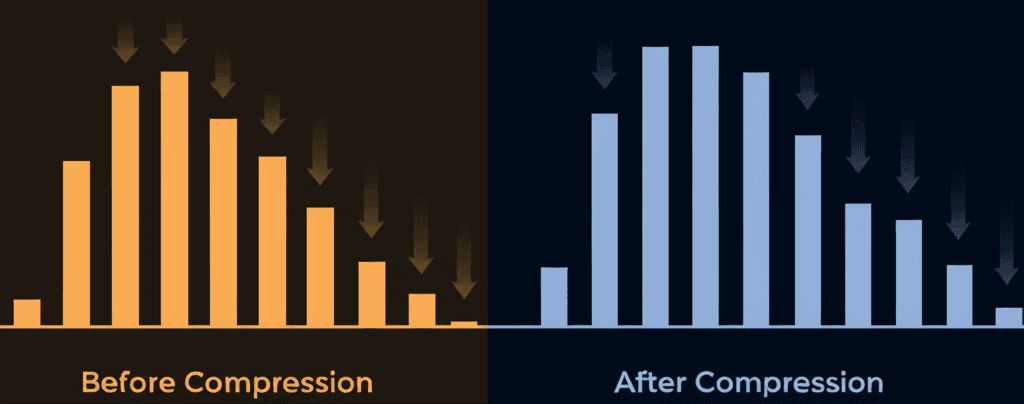
Audio compression reduces dynamic range.
Dynamic range is the difference between the loudest and quietest parts of a sound.
When a sound gets too loud, a compressor turns it down—automatically and smoothly. Quiet parts stay the same. Loud parts get controlled. That's it.
Compression does not make everything louder by default. It makes loud things less loud, which allows you to raise the overall level afterward if you want.
A Real-World Analogy
Imagine someone reading a book out loud:
- Sometimes they whisper
- Sometimes they shout
Now imagine you're riding the volume knob the entire time:
- Turning it down when they shout
- Leaving it alone when they whisper
That's compression.
The compressor is just an automatic volume rider that only reacts when sound crosses a certain loudness point.
What Does Audio Compression Actually Do?
Compression has one core job: control dynamics.
But that single job creates several practical benefits.
1. Makes Sounds More Consistent
Vocals are the best example. Singers naturally get louder and quieter. Compression smooths those differences so the vocal stays present in the mix without you constantly reaching for the fader.
2. Helps Sounds Sit in a Mix
Uncompressed sounds can jump out unpredictably. Compression tucks them into place so they don't surprise the listener—or fight other elements.
3. Adds Density and Perceived Loudness
When peaks are controlled, you can raise the overall level. This makes the sound feel fuller and more confident without actually being harsher.
4. Shapes Transients and Feel
Compression doesn't just control volume—it affects how sounds hit. That's why drums can feel punchy, soft, aggressive, or smooth depending on compression settings.
What Compression Is NOT
Let's clear up a few common misunderstandings.
- Compression is not distortion
- Compression is not EQ
- Compression is not mandatory
You can absolutely overuse it. And sometimes the best compression choice is no compression at all.
The Four Main Compression Controls Explained Simply
Most compressors look complicated, but they all boil down to four main controls.
If you understand these, you understand compression.
Threshold: When Compression Starts
Threshold sets the loudness level where compression begins.
Below the threshold: nothing happens
Above the threshold: compression kicks in
Analogy: A Speed Limit
Imagine a speed camera on the road.
- Drive under 60 mph → no problem
- Go over 60 mph → ticket
The threshold is the speed limit.
Lower threshold = compression activates more often
Higher threshold = compression activates less often
Ratio: How Much Compression Happens
Ratio determines how aggressively the sound is turned down once it crosses the threshold.
A ratio of 2:1 means:
- For every 2 dB over the threshold, only 1 dB comes out
A ratio of 4:1 means:
- For every 4 dB over, only 1 dB comes out
Practical Rule of Thumb
- 2:1 to 3:1 → gentle control
- 4:1 to 6:1 → firm control
- 10:1 and up → limiting
Ratio answers one question: "How strict is this compressor?"
Attack: How Fast Compression Reacts
Attack controls how quickly the compressor responds after the signal crosses the threshold.
Fast attack:
- Grabs the sound immediately
- Smooths peaks
- Can reduce punch
Slow attack:
- Lets the initial hit through
- Preserves impact
- Feels more energetic
Analogy: Catching a Ball
- Fast attack = grabbing the ball instantly
- Slow attack = letting it travel a bit before catching
This control is huge for drums, vocals, and anything percussive.
Release: How Fast Compression Lets Go
Release determines how quickly the compressor stops compressing after the sound drops back below the threshold.
Fast release:
- More energetic
- Can sound jumpy if too fast
Slow release:
- Smoother
- More natural
- Can feel heavy if too slow
Think of Breathing
Attack is inhaling.
Release is exhaling.
You want it to feel natural—not rushed, not strained.
How All Four Controls Work Together
Compression isn't about any single knob—it's about balance.
- Threshold decides when compression starts
- Ratio decides how much happens
- Attack shapes the front edge
- Release shapes the tail
Once you hear them as a system, compression becomes intuitive instead of technical.
When Should You Use Compression?
Compression is most useful when a sound is dynamically inconsistent.
Common Good Uses
- Vocals with volume swings
- Bass guitar jumping between notes
- Drums needing control or punch
- Acoustic instruments with uneven playing
- Spoken word and podcasts
Compression helps when something feels uncontrolled, unstable, or hard to place.
When You Should NOT Use Compression
This part matters just as much.
Don't Compress When:
- The sound already feels balanced
- You're trying to fix a bad recording
- You don't know why you're compressing
- Compression removes life or emotion
Compression is not a requirement. Silence, space, and dynamics are part of music too.
Common Beginner Compression Mistakes
I see these constantly—and I've made every one myself.
1. Compressing Everything by Default
Compression is a tool, not a rule. Ask what problem you're solving first.
2. Using Too Fast an Attack
Fast attack kills transients. This is the #1 reason mixes sound flat.
3. Over-Compressing Vocals
Too much compression makes vocals lifeless and fatiguing.
4. Ignoring the Bypass Button
Always A/B your compression. If it doesn't sound better, remove it.
Quick-Start Compression Settings to Try
These won't be perfect—but they'll get you close.
Vocals (General Starting Point)
- Ratio: 3:1
- Attack: Medium (10–30 ms)
- Release: Medium-fast
- Threshold: Aim for 3–6 dB gain reduction
Bass Guitar
- Ratio: 4:1
- Attack: Medium
- Release: Medium
- Goal: Even note levels
Drums (Punchy)
- Ratio: 4:1
- Attack: Slow
- Release: Fast
- Threshold: Taste
Spoken Word / Podcast
- Ratio: 3:1 to 4:1
- Attack: Medium-fast
- Release: Medium
- Goal: Consistent loudness
These are starting points—not rules.
Compression vs Limiting (Quick Clarification)
Limiting is just extreme compression.
- Very high ratio
- Very fast attack
Limiters are used to stop peaks from ever exceeding a ceiling. Compression is more musical and flexible.
Why Compression Feels Confusing at First
Compression is hard because:
- You don't see it easily
- The effect is subtle
- Bad settings don't always sound obviously bad
The breakthrough comes when you stop twisting knobs randomly and start listening for control instead of loudness.
How to Practice Compression (The Right Way)
Here's a simple exercise:
- Loop a vocal or drum track
- Use extreme compression settings
- Listen to what each knob does
- Back everything off
Exaggeration teaches faster than subtlety.
Final Thoughts: Compression Is About Intention
Compression isn't about making things loud.
It's about:
- Control
- Consistency
- Shape
- Feel
Once you stop fearing it and start listening for what it's actually doing, compression becomes one of the most powerful tools you have.
Next Steps
If this helped, here's where I'd go next:
- EQ: shaping tone before compression
- Gain staging: feeding compressors properly
- Serial vs parallel compression
- Compression on buses and mixes
Compression makes more sense when it's part of a system—not a mystery box.
If you want help choosing the right compressor or dialing one in faster, that's exactly what we explore here at Malinow Audio.
You've got this.
Related Articles
How to Use Reference Tracks: The Pro Mixing Secret
Reference tracks are how professionals avoid mix blindness. Learn to use them effectively without losing your own sound.
Delay Settings for Vocals: From Subtle to Dramatic
How to use delay on vocals without creating a muddy mess. Practical settings for slap, tempo-sync, and throw delays.
Volume Automation in Mixing: The Secret to Professional Mixes
Compression isn't enough. Learn how volume automation separates amateur mixes from professional ones.